

Relationships
Keep relationship history close.
Review contacts, lead preferences and previous conversations before preparing a follow-up.
- Contacts
- Qualification
- Conversation history
FOR MONTRÉAL & QUÉBEC BROKERAGES
Bring relationships, properties, conversations and deal evidence into one workspace. Give your brokerage team a clearer view of what needs attention and why.
Brokerage context, with broker judgment at the centre.
EXPLORE THE AGENT WORKFLOWS
Follow up with a lead, compare an investor mandate, or review a financing risk. Switch examples to see the evidence and a proposed message for each.
Camille asked about Saint-Laurent. The French reply asks about space requirements and timing before suggesting a property.
SOURCE CONTEXT
Observed · sample inbound message. Camille asked about Saint-Laurent. The next step is to confirm space requirements before recommending a property.
Client conversation · proposed reply
THE DAILY BRIEFING
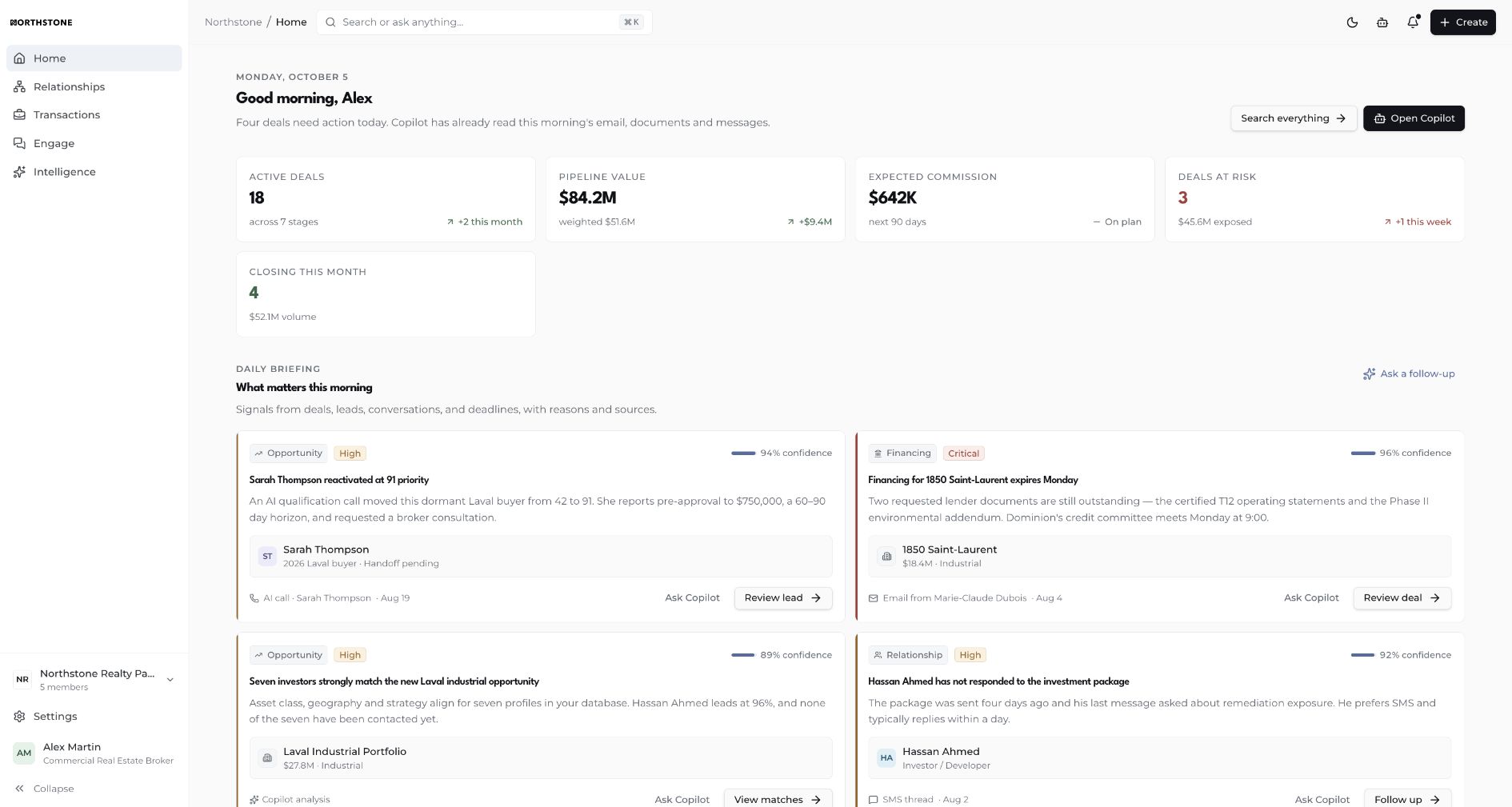
Review priorities, open tasks and pipeline context in the home briefing. Then open the relationship, property or deal record behind each item.
Sign in to NorthstoneNorthstone · Home briefing
BROKERAGE CAPABILITIES
Relationships
Review contacts, lead preferences and previous conversations before preparing a follow-up.
Transactions
Follow property records, financing conditions and outstanding documents alongside deal progress.
Intelligence
Compare investor mandates and deal signals with their sources, confidence and open questions.
SOURCE TRANSPARENCY
Northstone's trust model distinguishes verified, observed and inferred information. Review the source and what remains uncertain before acting.
Read the record or conversation behind a recommendation.
A matching mandate does not confirm buying intent. An open condition still needs evidence.
The agent concept shows proposed messages for broker review. The public demo sends none.
PRODUCT QUESTIONS
Northstone is commercial real estate intelligence software that brings relationships, properties, conversations and deal evidence into one brokerage workspace. Its daily briefing, transaction records and source-backed intelligence help teams review priorities and decide what to do next.
Northstone is designed for commercial real estate brokers and brokerage teams, with Montréal and Québec context. The public examples cover a Saint-Laurent lead, an industrial investor mandate in Laval and a financing condition in Dorval.
Switch between lead follow-up, investor matching and financing risk. Each workflow example shows the available evidence, facts still to confirm and a proposed message for broker review. Matching an investor mandate does not establish buying intent; an outstanding financing document does not establish that a condition is satisfied.
The public walkthrough uses three prepared examples selected in your browser. It does not access workspace records, generate live AI responses, store your request or deliver messages. Sign in to access your configured Northstone workspace.
Yes. Choose Lead follow-up or enter a request containing relance. That example includes a prepared French reply for Camille. The demo selects a scenario from keywords; it does not generate arbitrary replies or establish that the full application is translated into French.
The phone illustrates a client conversation and proposed reply. It does not represent a released Northstone iOS or Android app. You can explore the public demo in a mobile browser.
EXPLORE NORTHSTONE
Workspace access requires a Northstone account.